If you run a PageSpeed Insights test for a key page on your website and see a Performance score of 91, it is tempting to assume all is well with performance optimisation and move on to the next SEO task. After all, a score above 90 puts you firmly in Google’s green zone of it’s traffic light scoring system.
However, I’ve recently been reviewing the Core Web Vitals for a client – and their wider performance due to highly volatile rankings on Mobile when Desktop rankings have been stable. That’s often a sign of a performance issue which is most likely to have an initial impact on Mobile rankings.
A closer look at the metrics for this important page for driving organic traffic might initially seem to show a puzzling discrepancy. A high overall performance score of 91 yet a “Needs Improvement” Largest Contentful Paint (LCP) of 2.9 seconds.
How can a page score so well while failing one of web performance’s most important metrics?
And, more importantly, is it actually worth spending time and effort to fix it?
Let’s take a look…
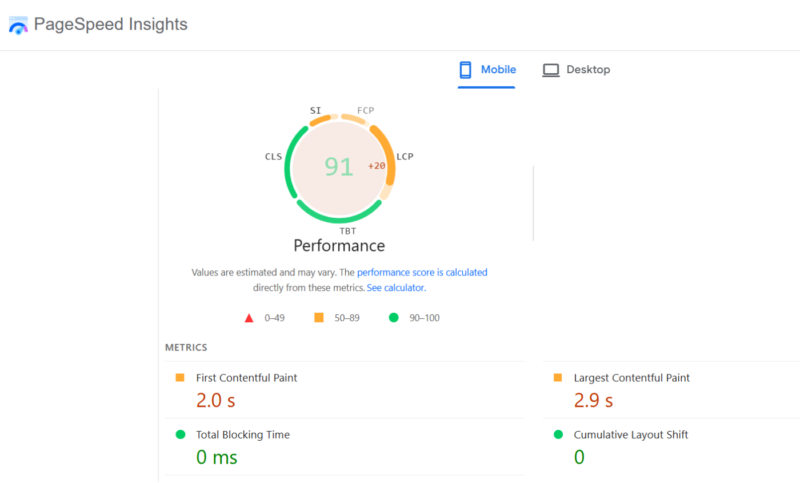
How a Page with a 2.9s LCP Scores 91
To understand why this happens, you have to look at how Lighthouse calculates its aggregate score.
The Lighthouse Performance score is a weighted average of five distinct metrics:
- Total Blocking Time (TBT): 30% weight
- Cumulative Layout Shift (CLS): 25% weight
- Largest Contentful Paint (LCP): 20% weight
- Speed Index (SI): 15% weight
- First Contentful Paint (FCP): 10% weight
Notice that just two items – TBT and CLS combined – make up 55% of the total score.
If a page has zero visual shifting (CLS) and zero main-thread JavaScript lockups (TBT), you instantly capture more than half of the available points for the overall score. That massive buffer easily absorbs the score penalty caused by a sluggish LCP of 2.9s (where Google’s target threshold is under 2.5s).
In short, a page can have flawless layout stability and responsiveness, but still leave users waiting for the primary content to render. And the 91 score disguises this problem.
Why Fixing LCP Still Matters (Even with a Performance score of 91)
While a 91 score looks great on a status report, making decisions based on the aggregate number alone can hide key user experience issues and SEO risks.
There are 3 reasons for this:
1. Google Evaluates Core Web Vitals on a Pass/Fail Metric Level
When Google assesses your page for search rankings, it doesn’t just look at the overall Lighthouse aggregate. Core Web Vitals are evaluated individually on a pass/fail basis:
- LCP: < 2.5 seconds (Pass)
- INP: < 200 milliseconds (Pass)
- CLS: < 0.1 (Pass)
If your LCP sits at 2.9s, as in the example I mentioned above, your page falls into the “Needs Improvement” category. You aren’t getting the full benefits of passing the complete Core Web Vitals assessment.
And, as a reminder, the Core Web Vitals metrics can directly impact ranking positions in Google search.
2. Perceived Load Speed Drives Conversions
LCP measures perceived load speed i.e. the point at which a user feels like the page has actually loaded because the main element, such as an image or main heading, is visible on screen.
Even if your page is interactive immediately, a 2.9s delay on weaker mobile connections or slower devices can make the site feel sluggish, increasing bounce rates and reducing conversion rates before the user even reads your first line of text.
3. The Effort-to-Reward Ratio is Unusually High
When a page already scores 91, fixing LCP usually requires targeted tweaks, not a ground-up rebuild.
For instance, addressing an LCP delay typically comes down to a few quick wins:
- Establishing Preconnects: Adding a simple <link rel=”preconnect”> hint for critical third-party domains can shave off hundreds of milliseconds of connection latency.
- Removing Render-Blocking Scripts: Deferring or asynchronously loading scripts like jQuery clears the main thread so the visual element can render sooner.
- Optimising Image Sizing: Ensuring above-the-fold images aren’t being delivered at twice their display size saves bandwidth and speeds up render times.
By applying just one of these quick fixes to our client page, their expert web developer knocked 0.5s off the LCP.
By bringing the LCP of 2.9s down into the green zone under 2.5s, we weren’t just chasing a perfect 100 on PageSpeed Insights so it looked good on the status update. Instead, we were ensuring the page fully satisfies Google’s ranking criteria and delivers a noticeably faster experience to every real-world visitor. And, of course, eliminating that undesirable volatility in the Mobile rankings.

Established as an SEO specialist since 2009, after a career as a software engineer in the oil industry and investment banking. Michelle draws on her technical experience to develop best-practice processes for implementing successful SEO strategies. Her pro-active approach to SEO in the AI-era enables businesses to reach new audiences, both nationally and internationally. She has a wealth of cross-industry experience from startups to Fortune 500 companies.